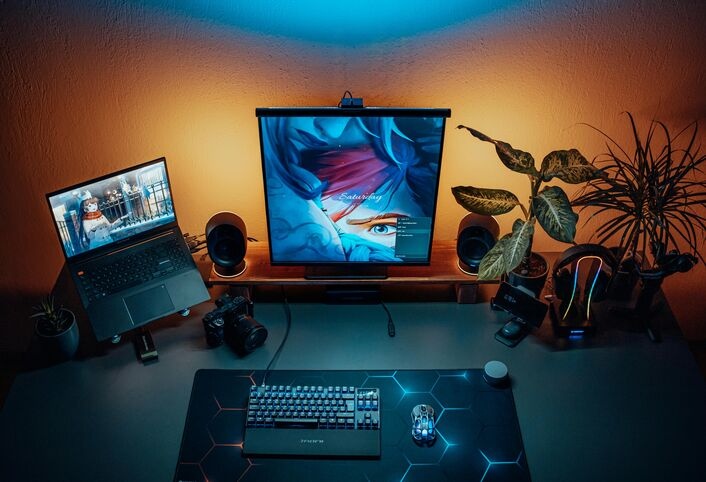
Whether you are a casual gamer or a competitive pro, an appropriate gaming computer can significantly improve your experience. In the year 2025, video games are way more demanding. Thus, playing on a low-spec machine will not suffice at all. To have fast frame rates, graphics that engulf you in the game, and no lag in performance, a powerful gaming computer is an absolute necessity.
This guide is a one-stop shop for all the information you need when it comes to buying, building, or upgrading a gaming computer. We will talk about the most significant components, how to get the best value for your money, and what to keep an eye on in the U. S. market.
What Do You Mean by the Term Gaming Computer?
A gaming computer is a high-end PC custom-designed to run video games at a high performance level. It is not a standard desktop or laptop; rather, it comes with stronger parts like high-end GPUs, fast CPUS, and a lot of memory.
Due to this reason, gaming computer can easily run today’s highly demanding games like Call of Duty, Fortnite, or Cyberpunk 2077. They also allow for high resolution, fast refresh rates, and even virtual reality (VR).
Gaming Computer vs. Regular Computer
At first glance, a gaming PC might look like a regular computer. However, the internal components are much more advanced. Let’s compare the two:
| Feature | Gaming Computer | Regular Computer |
|---|---|---|
| Graphics Card (GPU) | High-performance (e.g. RTX 4070, RX 7900) | Basic or integrated |
| CPU | Fast, multi-core (e.g. Ryzen 7, i7) | Entry to mid-level processors |
| RAM | 16GB or more | 8GB or less |
| Cooling | Advanced air or liquid cooling | Basic fan system |
| Upgrade Potential | Highly upgradeable | Often limited |
| Gaming Capability | Ultra settings, 4K/VR support | Limited to low-end or older games |
Therefore, if you’re serious about gaming, then clearly, investing in a gaming computer is the smarter and more future-proof choice.
Key Components of a Gaming Computer
To make a successful purchase, it is necessary to know the contents of a gaming PC. The following are the most significant parts outlined:
Graphics Card (GPU)
The GPU produces all the visuals. Actually, it is the most important part of any gaming computer. It influences everything, resolution, and frame rates.
The premium GPUs in 2025 are:
- NVIDIA GeForce RTX 4070, 4080, or 4090
- AMD Radeon RX 7800 XT or RX 7900 XTX
In case you are gaming at 1080p, a mid-range card like the RTX 4060 Ti is sufficient. For 1440p or 4K, you will require a high-end model.
Processor (CPU)
The CPU processes game logic and multitasking. While it is not a game-changer, the GPU is still needful, especially when you stream or record gameplay.
Recommended choices:
- AMD Ryzen 7 7800X3D
- Intel Core i7-13700K or i9-13900K
RAM (Memory)
As a result, a system with more RAM can not only load assets faster but also handle multitasking smoothly without any lag.
- Minimum: 16GB DDR4 or DDR5
- Ideal: 32GB for modern games and heavy multitasking
Storage
Speed is the most important thing when it comes to storage. So, solid-state drives (SSDs) are a must-have now.
- For optimal speed, use an NVMe SSD for your operating system and favorite games.
- Additionally, add an HDD if you need extra storage for large files.
Motherboard
Since your motherboard connects everything, it’s important to ensure it supports your chosen CPU and, additionally, includes extra ports for future upgrades.
Power Supply (PSU)
To ensure system stability, your setup must be protected by a reliable PSU. Therefore, look for an 80+ Gold certified model with sufficient wattage to safely power both your GPU and CPU.
Cooling System
In order to prevent overheating, proper cooling is essential in your gaming PC. When choosing a cooling method, you can go with either:
- For budget or mid-range builds, air cooling is often the preferred and cost-effective option.
- On the other hand, liquid cooling offers better performance and quieter operation, making it ideal for high-end systems.

Prebuilt vs. Custom Gaming Computers
When it comes to choosing your gaming PC, you have two options: a prebuilt system or a build-it-yourself gaming computer. Each option has advantages and disadvantages.
Prebuilt Gaming PC
Pros:
- Ready for use as soon as it is taken out of the box
- Warranty and support included
- Suitable for novices
Cons:
- Limited customizability
- It might be pricier compared to the same specs
Custom-Built Gaming PC
Pros:
- Completely customized to your liking
- Usually provides better value
- You can upgrade it more easily in the future
Cons:
- Requires technical know-how
- More time and research are needed
If you happen to be a newbie in the world of gaming computers, then a prebuilt system might be the best choice for you. On the other hand, if you wish to have full control and customization, building your own gaming PC may prove to be a great experience if you want full control and customization.
Best Gaming Computers in 2025 (USA)
If you are shopping in the U.S., then ideally, you should also take a look at some of the best gaming PCs of the year:
- Alienware Aurora R16 – the top of the line with lots of power and a great appearance
- NZXT Player: Three – solid mid-range build with good airflow
- CyberPowerPC Gamer Xtreme VR – excellent performance for 1080p and VR gaming
- iBUYPOWER SlateMR 291i – good choice if you are looking for something under $1,000
- HP Omen 45L – an ultra build that consists of liquid cooling
Fortunately, these can be easily found in popular stores like Best Buy, Amazon, Newegg, or Micro Center, all of which are conveniently located across the U.S.
Buying Tips for Your Gaming Computer
Before you make a final decision, think about the following:
- Set a Clear Budget
Decide how much money you want to invest in your gaming computer. The starting price for entry-level systems is $800. If you want a high-quality performance, then prepare to spend $2,000 or more.
- Focus on the GPU
When it comes to gaming, the GPU should take the most of your budget. Its impact on performance is greater than that of any other component.
- Plan for the Future
Make sure your computer can be upgraded. This not only prolongs its lifespan but also allows it to keep up with the future game demands.
- Don’t Forget the Monitor
To get the most out of your setup, your monitor should fully support your PC’s capabilities. Moreover, if you’re into competitive gaming, be sure to look for a high refresh rate monitor (144Hz or more).
- Add Quality Peripherals
A good gaming PC needs more than just powerful hardware. Get a mechanical keyboard, fast mouse, and high-quality headset to complete your gaming setup.
Maintenance Tips for Long-Term Performance
To keep your gaming computer running great:
- Do the cleaning of dust from fans and vents regularly
- Drivers should be updated regularly, especially for the GPU
- Use monitoring tools to monitor temperatures and performance
- Back up your files regularly
- Run antivirus software to stay safe
Indeed, a little maintenance goes a long way in consistently keeping your system fast and efficient over time.
Final Thoughts: Choosing the Right Gaming Computer
In case you think like that, getting the right gaming computer is going to be a smart investment — especially considering that it is 2025 when game requirements will be highest. You can either choose to buy a setup that supports you through explorations of open worlds or playing competitive esports; the right one makes all the difference.
First, understand your needs well and take your time with the decision. Furthermore, if you are on a tight budget, consider going for a balanced build that prioritizes the GPU. However, if performance is your only concern, then investing in a high-end custom system is the best choice.
In either case, you will benefit from shorter loading times, improved graphics, and an overall smoother gaming experience.